Get your Google Shopping products approved again
Merchant Guard scans your Merchant Center account, explains every issue in plain English and fixes most of them in one click: prices, stock, barcodes, images and more. You review every change, and you can undo any of them.
- Free plan, no card needed
- Works with any feed
- Set up in two minutes
What it fixes
The issues that keep products out of Shopping ads, and what Merchant Guard does about each one. Google’s own wording is underneath, so you can match it to what you see in Merchant Center.
Reads the live price from each product page (or Shopify) and writes the correct one. Turns on Google’s automatic price updates so it doesn’t happen again.
One clickChecks whether each product is really in stock on your site and corrects the availability Google has.
One clickPulls real GTINs from Shopify, a spreadsheet you upload or your product pages, and validates every check digit. It never invents a barcode.
One clickFinds the brand and part number in your store data or your page’s product markup and fills them in.
One clickTests every image link for size and access, then swaps in a working image from your product page.
One clickFollows each link, spots 404s and redirects, and suggests the right page from your store.
One clickClaude drafts compliant values from your product data. You check them, edit anything, then apply them all at once.
AI draftedClaims your website and switches on automatic item updates from inside the side panel.
One clickShows Google’s own fix action for your account, right in the panel, with a plain-English explanation of what to enter.
GuidedA checklist of what Google looks for, with the assistant reviewing your site against it before you request a review.
GuidedFind. Fix. Verify.
Add Merchant Guard to Chrome and connect the Google account you use for Merchant Center. From then on it works in three steps, in Chrome’s side panel right next to Merchant Center.
Find
Merchant Guard scans your account and shows a health score, every issue grouped by cause and how many products each one affects, in plain English with Google’s wording underneath.
Fix
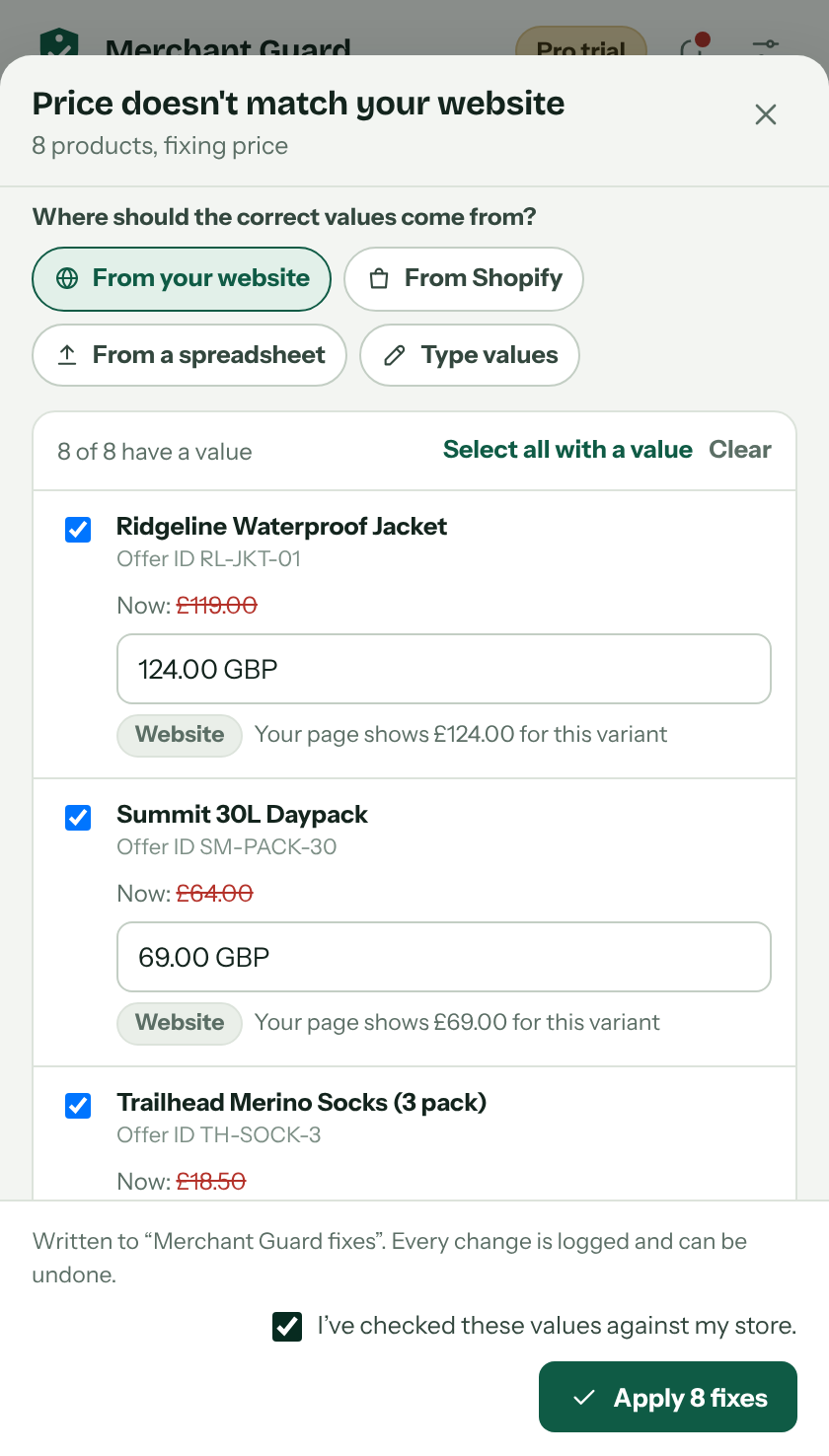
It finds the correct values on your website, in Shopify or in a spreadsheet. You check them, then apply them all in one click. Nothing changes until you press Apply.
Verify
Your next scan confirms which issues cleared, and 24/7 monitoring keeps watching. Every change is logged with one-click undo.
Fixes you can check before they go live
Every fix shows the current value, the value Merchant Guard found and where it came from. Untick anything you’re not sure about.
- Values from your own store. Your product pages, Shopify, or a spreadsheet you upload. Nothing guessed.
- Your feed stays untouched. Fixes go into a separate “Merchant Guard fixes” source that works with Shopify, WooCommerce, files and API feeds.
- Undo in one click. Every change is logged with what it replaced.
An assistant that knows your store
Ask about any error in your own words. The assistant, powered by Claude, looks at your live Merchant Center data, finds the cause and prepares the fix for you to approve.
- Answers from your account, not generic advice. It can read issues, products and Google’s explanations.
- Gets better over time. It remembers your store’s setup, and learns which fixes work across stores like yours.
- It suggests, you decide. The assistant can’t change anything without your click.
Google re-checked your site yesterday and found 14 product pages showing lower prices than your product data. It looks like your autumn sale went live on the website but not in your feed.
I found the sale price on all 14 pages, so I can update them now.
Review fix
Hear about problems before your sales drop
With Pro, Merchant Guard checks your account around the clock, even with Chrome closed, and emails you the moment Google flags something new.
- Checks on a schedule you choose: as often as every 3 hours on Pro, or hourly on Agency.
- Only tells you what changed: new disapprovals, new account warnings and fixes that worked.
- A health score over time, so you can see whether things are getting better.
Google flagged new issues in your Merchant Center account since the last check.
- 2 products: stock status doesn’t match your website
- 1 product: image too small
Your health score went from 94 to 89. Most of these can be fixed in one click.
Fix in Merchant GuardBuilt to be safe with your store
Merchant Center is how your products reach buyers. These are the rules Merchant Guard works by.
Nothing changes without you
Every fix is shown to you first, with the old and new value side by side.
No invented barcodes
GTINs only come from your store, your files or your packaging, and every one is checked.
Your feed stays as it is
Fixes sit in their own source in Merchant Center. Remove it and everything is back to how it was.
Every change can be undone
The fix history shows what changed, when and why, with an undo button on each change.
Your data isn’t for sale
We never sell your data or use it to train AI models. Delete your account and it’s gone.
Google’s official API
Merchant Guard uses the Merchant API with your permission. No scraping, no shared passwords.
Start free. Upgrade when it pays for itself.
Pro comes with a 14-day free trial. Cancel any time from your account.
Free
See what’s wrong and fix a few products
Free forever
- Store health scan and issue list
- Plain-English explanations and Google’s fix actions
- Fix your first 5 products in one click
- A few assistant questions a day
Pro
For a store that relies on Google Shopping
or £190 a year
- One-click fixes for every product
- Fixes using your website and Shopify data
- 24/7 monitoring with email alerts
- Assistant with live access to your store
- Bulk editor, fix history and undo
Agency
For agencies and multi-store sellers
or £590 a year
- Everything in Pro
- Monitor up to 25 Merchant Center accounts
- Client-ready health reports
- Higher assistant and page-check limits
- Priority support
Questions sellers ask
Will Merchant Guard change my products without asking?
No. Merchant Guard shows you every proposed change and only sends it to Google after you tick “I’ve checked these values” and press Apply. Scanning is read-only.
Does it work with Shopify, WooCommerce or a spreadsheet feed?
Yes. Fixes are written to a separate supplemental source called “Merchant Guard fixes”, which Google applies on top of any primary feed: Shopify’s Google channel, WooCommerce plugins, Google Sheets, scheduled files or the API. Your feed keeps syncing as normal.
How quickly do fixed products get approved?
Google usually processes changes within a few hours, occasionally up to a few days. Merchant Guard re-checks fixed products on your next scan and tells you which issues cleared.
Can it get a suspended account reinstated?
No tool can promise that, and you should be wary of any that does. Merchant Guard helps you find and fix the likely causes, and walks you through what Google checks before you request a review.
Is it safe to give Merchant Guard access to my Merchant Center?
Merchant Guard uses Google’s official sign-in and the Merchant API. You can see exactly what it’s allowed to do on Google’s permission screen, and remove access at any time from your Google account. Read our security overview.
Is Merchant Guard made by Google?
No. Merchant Guard is an independent UK business that builds on Google’s public Merchant API.
More answers in the help centre, or email support@merchant-guard.co.uk.
Fix your first five products today, free
Install Merchant Guard, connect Google and see your store’s health score in about two minutes.